snow-api-docs
PAM / Wallet API Documentation
Version: 0.1
Last Updated: 02 December 2025
—
Changelog
| Version | Description |
|---|---|
| 0.1 | Initial documentation |
1. Purpose
This document provides the API specifications for the PAM / Wallet Service. It describes how to fetch user balances, retrieve transaction history, and trigger balance updates within the Go microservice environment.
2. Scope
This documentation covers:
- Balance retrieval APIs
- Balance update APIs
- Get Users
- Optional sequence diagrams
3. Architecture Overview
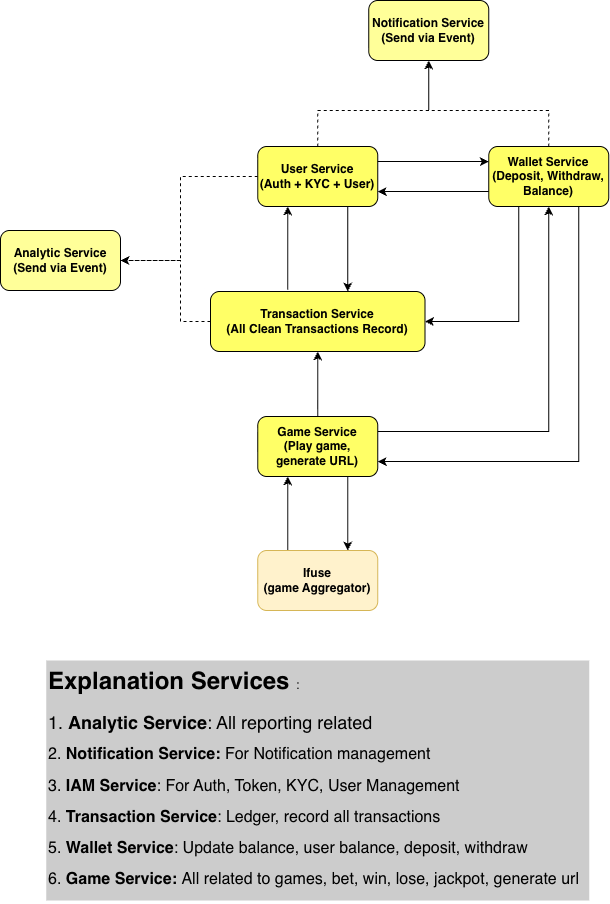
Describe how the Wallet Service interacts with other microservices such as Game Service, Promotion Service, and Transaction Service.
4. Authentication
Headers required:
Authorization: Bearer <jwt_token>
Content-Type: application/json
A valid JWT token is required for all endpoints.
There are 2 types of authentication: Admin and User
User will be used for public endpoints
Admin will be used for admin endpoints
5. API Endpoints
BASE_URL = https://www.staging.prohades.com
Notes: All Endpoint still On Progress and will be updated periodically
5.1 GET Balance
Endpoint:
GET {BASE_URL}/wallet/admin/v1/balance/{userID}
Description:
Fetch the user’s current wallet balances.
Balances will be returning multiple currencies
Uses token admin
Response Example:
{
  "success": true,
  "message": "success",
  "data": {
    "balances": {
      "KRW": 150,
      "JPY": 150,
    },
    "bonus": {
      "KRW": 150,
      "JPY": 150,
    }
  }
}
5.2 POST Balance Update
Endpoint:
PUT {BASE_URL}/wallet/admin/v1/balance/{userID}
Description:
Perform a balance update using a defined transaction type
Uses Token admin
Request Example:
{
  "user_id": "UUID",
  "currency": "KRW",
  "amount": 150,
  "type": "bet", // deposit, withdraw, bet, won, lost
  "transaction_reference": "TRX-338833", //referenced to transaction that made this update
}
Response Example:
{
  "success": true,
  "message": "Update balance completed",
  "old_balance": 50,
  "new_balance": 50
}
5.3 GET users details
Endpoint:
GET {BASE_URL}/admin/v1/users/{id}
Description:
Fetch the user’s current details.
Uses token admin
Response Example:
{
  "id": "00000000-0000-0000-0000-000000000000",
  "uuid": "user-uuid-string",
  "username": "john_doe",
  "email": "john@example.com",
  "avatar": "https://example.com/avatar.png",
  "lang": "en",
  "status": "active",
  "email_verified_at": "2025-01-01T00:00:00Z",
  "withdraw_locked_until": "2025-02-01T00:00:00Z",
  "kyc_status": "pending",
  "onboarding_step": "kyc_profile",
  "kyc_profile": {
    "first_name": "John",
    "last_name": "Doe",
    "birthday": "1990-05-12T00:00:00Z",
    "gender": "male",
    "country": "US",
    "document_type": "passport",
    "document_url": "https://example.com/documents/passport.png",
    "phone_number": "+123456789",
    "withdraw_password": "******"
  },
  "finance": {
    "bank_name": "ABC Bank",
    "bank_number": "9876543210",
    "bank_account_name": "John Doe"
  },
  "referer": null,
  "members": 12,
  "transaction": {
    "deposit": 1000000,
    "withdrawal": 500000,
    "difference": 500000
  },
  "balance": {
    "main": {
      "KRW": 1500000,
      "USD": 200
    },
    "bonus": {
      "KRW": 50000
    }
  },
  "gaming_transaction": {
    "bet": 2000000,
    "win": 1500000,
    "gross_gaming_revenue": 500000,
    "net_gaming_revenue": 450000
  },
  "login_data": {
    "join_ip": "192.168.1.10",
    "last_ip": "192.168.1.20",
    "join_date": "2024-03-10T10:00:00Z",
    "last_date": "2025-01-15T18:30:00Z"
  },
  "capabilities": {
    "can_play": true,
    "can_deposit": true,
    "can_withdraw": false
  }
}
6. Flow
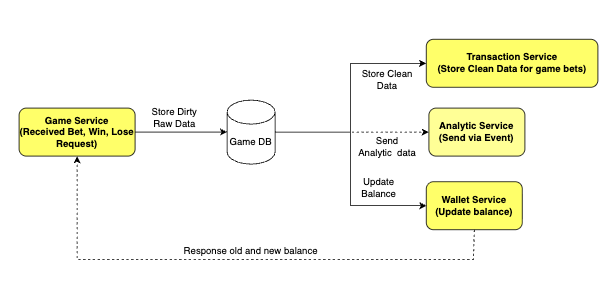
Case: When user plays game
- When Game Service get bet/win/lose request